Welcome to Customizing and Integrating OER
OER are offered in a wide variety of digital formats, and open licensing enables us to edit and share learning content without copyright restrictions.
When selecting OER, matching the content to learning objectives is clearly the priority. But not every OER will be in direct alignment with those objectives, and you may want to add to, or edit, that OER in some way. Remember, one of the most powerful aspects of open licensing is the ability to modify, or remix, content.
Upon successful completion of this course, you will be able to:
- Define OECustomizingOER_badge.pngImageR editing platforms
- Compare and contrast OER editing platforms
- List the features of an editing platform
- Categorize editing platform features as necessary, desirable, or optional
- List technical options and protocols for integrating open content into learning management systems and other learning environments
- Explain how these technical options and protocols work
- Demonstrate the integration of OER content from an editing platform into a Learning Management System or other learning environment
Please watch the video below.
Adapted from "Welcome to Customizing and Integrating OER" Laura Murray and Phylise Banner on behalf of SUNY OER Services
Reviewing Your Options
Reviewing Your Options
Remixing a resource means you can adapt, reorganize, and remake a resource to create something new. This is especially helpful when you would like to adapt the material to learners’ needs, localize content to make the material more accessible, or add revised data to keep your resource current and up to date.
Example: You find an OER history lesson that has a Creative Commons CC BY license. The lesson includes most of the materials you want to cover, but is missing one key topic. You find another OER that also has a CC BY license that covers that missing topic. You can create a derivative work by taking both OERs and combining them – using only the content that aligns with your course objectives.
Yes You Can!
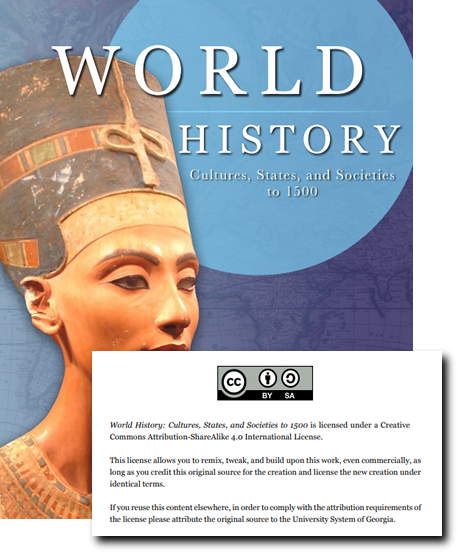
When it comes to working with OER, one of the conceptual hurdles faced by most people is around the notion of adapting or changing someone’s work. What exactly can be adapted within the scope of an OER? Won’t the original author get upset if you change their work?
Anything and everything in an OER can be changed as long as the conditions of the open license are met. The modifications or changes you make can be fairly minor or major depending on what you need to do to make the OER work for you.
Changing someone’s work can feel uncomfortable. But rest assured, if the author has released their work under a Creative Commons license that allows for adaptation (which is any Creative Commons license that does not have a No Derivative [ND] attribute added to it) then they expect that you will change the content, provided you give them the proper attribution. That’s one reason why attribution asks that you include the link back to the original source when available – viewers of your work will be able to compare it against the original if the need arises.
You are in charge of the resource – that is the beauty and power of OER!
Considerations
A good rule of thumb when customizing OER is to keep it simple, especially if you are approaching a remix project for the first time. While it may be tempting to make a number of major changes before releasing it to your students, think of the OER as a living resource that you can improve incrementally over time.
Click on each of the questions below for more to consider regarding the customization of OER:
How much content do you wish to change?
Do you want to remove content, or rewrite entire sections of content?
What technical format is the original work in?
A Word document is much easier to modify than a PDF document. If you are looking to customize a full textbook, you will need it in a workable technical format, i.e. an editable file type. These include:
- Pressbooks or WordPress files (.xml or .wxr)
- HTML files (webpages)
- Word document (.docx) or OpenDocument Text (.odt)
- Simple text files (.txt)
- EPUB
- LaTeX files (if the original book includes math or science formulas and equations)
It is common that open textbooks may only be available as a PDF document. PDF documents are great formats to distribute the final version of the textbook to students in, but a terrible format for editing or adapting. If you want to adapt an open textbook that is only available in PDF format, you will need to convert the PDF document to one of the formats above.
If you need to remix an OER that’s only available as a PDF, it’s worth contacting the original author and asking if other files for the resource are available. Many OER creators are very happy to share source files upon request.
What type of license is the content released under?
Does it have a Creative Commons license that allows for modification or adaptation of the content? Remember, as long as the Creative Commons license does not have a No Derivative (ND) attribute, you are able to make changes.
How comfortable are you with using technology and creating content?
Once you find an editable file, you are ready to begin your customization. The tools you use to create your remix will depend on the source file of the original OER and how comfortable you feel working with the format and tool.
Where do you plan to share your OER?
What additional information might be needed for repositories, libraries and other course material distribution channels?
Who can be of help/assistance at your institution?
Librarians can assist you with copyright concerns – for instance, providing advice when remixing OER content with different licenses, or assisting you with licensing your new derivative work.
If the work you want to remix is only available as a PDF, your institution’s librarians or instructional technologists may have tools that can help you edit these more easily.
Finally, it’s likely that the remixes you’ve made will be of value to others beyond your classroom walls. Your librarians and instructional designers can help you share your custom OER adaptation more broadly, if you wish.
Remember to take accessibility into consideration. Even if the original OER was not fully accessible, try to make your remix as accessible as possible so that every student will be able to access it.
Adapted from "Reviewing Your Options" by Laura Murray and Phylise Banner on behalf of SUNY OER Services
Customizing Textbooks
Customizing Textbooks

Adapting or changing an existing OER textbook doesn’t need to be onerous. The changes you make can be simple such as:
- Re-titling the book, some or all of its chapters, or its chapter sections
- Adding one or two new images
- Removing a chapter that isn’t pertinent to your course
- Isolating a chapter to be used, leaving the rest of the book behind
Sometimes, an adaptation might require more than a few simple changes. For example, you may want to remove a significant number of chapters — leaving behind just the ones that fit the course curriculum. Or, you might want to reorder content to more accurately fit the order in which material is presented in a course. Maybe you find an open textbook that fits your content, and you want to add new examples and/or exercises.
Below are 10 more reasons adapting an open textbook might be for you:
- Address a particular teaching style or learning style
- Adjust for a different grade or course level
- Address diversity needs
- Meet a cultural, regional, or national preference
- Make the material more accessible for people with disabilities
- Add material contributed by students or material suggested by students
- Translate the material into another language
- Correct errors or inaccuracies
- Update the book with current information
- Add more media or links to other resources
Keeping Track of Changes
When you customize any OER, you retain copyright of all new material you create. This means that even if the new material you create is released under an open license, as the author, you will receive attribution for your contribution.
As you edit and make changes (text and images) and/or add new material, such as a chapter or section within a chapter, keep a list so these additions/changes can be included as part of the Copyright Notice, and accurately attributed to you, the author. Minor changes, such as fixing grammatical or spelling mistakes, don’t need to be documented.
If you add material from another openly licensed work to your adaptation, especially text, record the source and where it is used in your adapted version. This information is needed for the wording and placement of each attribution statement required for each open CC BY (Creative Commons Attribution) licensed work you use.
When remixing materials from multiple sources, complexity can mount. One strategy for keeping yourself organized, and making sure that all your sources get properly credited, is to keep an ongoing table of contents as you work.
You can create your own tools to keep track, or use this spreadsheet as a model. Feel free to adapt or modify this resource to suit your own purposes.
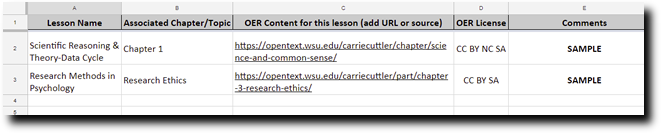
Access this OER Content Template in Google Drive
Finally, know that adaptations don’t have to happen all at once, nor do they have to be done by one person. Will the adaptation benefit other faculty members in your department? Consider making it a collaborative effort. Students can also be very integral to the customization process – they can provide feedback about what areas of a text might be most effective to change, and how.
Adapted from "Customizing Textbooks" by Laura Murray and Phylise Banner on behalf of SUNY OER Services
Sharing & Sharing Alike
Sharing and Sharing Alike
Remember that every Creative Commons license contains an attribution (BY) clause. This means that you must include a statement that gives credit to, or attributes, the creator of the work from which you have customized/remixed, whether it’s text, an image, a video, or other item. If you have made a change, indicate that in your attribution statement.
An example:
This work is an adaptation of Introduction to Human Geography (on Open Geography Education) by R. Adam Dastrup, and is used under a CC-BY-SA 4.0 International license.
When you customize/remix an OER, the new content can be released with whatever open license you choose. If you are customizing an OER textbook, any new content you create can be licensed as you like, while the rest of the book will be released under the license of the original book. In other words, you need to respect the license of the original work. You cannot license what you do not create. You can only attach a CC-BY (Creative Commons Attribution), or other open license to the parts of the book that you have created and are new.
However, there is a caveat. If the textbook you are adapting has a Share-Alike condition (e.g., CC-BY-SA 4.0) stipulated, then you must release the entire book using the same license as the original book.
More Sharing Considerations

Photo by Patrick Tomasso on Unsplash
There are multiple motivations and points of entry into using OER: cost savings for students, the benefits of open pedagogy, full control over teaching content, and more. Thinking about sharing your OER creation may feel like a question you don’t need, or want, to answer in your first venture into open. However, planning to share is far less taxing at the beginning of OER customization and creation than after your work is “done.”
Global sharing requires a mindful approach to both mixing open and “closed” licensing and content format. You don’t have to navigate these decisions alone, or create new design models from scratch.
In a nutshell, there are just two aspects to global sharing:
- The openly licensed portion of your courseware should be autonomously coherent and usable.
- The format is which it is published should be meaningfully adoptable and editable.
An example:
When you develop open courseware in a platform such as Pressbooks, you put only openly licensed content in Pressbooks, but can add materials with “closed” licenses in your LMS, such as Moodle. This model allows you to create the course you need to offer but also to readily share the open portion. From Pressbooks, you can export into editable formats, thereby supporting efficient adoption by anyone, anywhere.
Local sharing is more easily accomplished with the support of instructional design and technology staff. A copy of your courseware in the LMS can become an immediately adoptable and customizable resource for colleagues without the need to keep open content segregated from “closed.” Your LMS administrator can create a “library” of adoptable open courses for all campus faculty to review and share.
Adapted from "Sharing and Sharing Alike" by Laura Murray and Phylise Banner on behalf of SUNY OER Services
Exploring Editing Tools
Exploring Editing Tools

Photo by Tim Gouw on Unsplash
Customizing OER can be as simple as opening up a Google Document and editing a paragraph, to revising an entire OER textbook to suit your needs. Editing platforms enable you to customize and remix existing OER, as well as create new OER.
Features to Look For
When you are exploring OER editing platforms, keep the following criteria in mind:
File formats. OER come in a variety of file types, so check the format of the OER you want to customize before you get started. If the file format is not easily editable, it can take a considerable amount of time to find a work-around. For example, PDF files are great for sharing with your students, but are not easy to edit. If you want to copy and paste all the content from one format into another you can, but that may not be the way you want to spend your time.
Export formats. Take note of all available export formats when you are working in an editing platform. You may find an OER textbook that is almost perfect for your course, and want to add an extra chapter. If you find a platform where you can customize that textbook, make sure that you can export the remixed textbook in a format that you can use in your course – an accessible format that all of your students can use.
Here are some common file export formats that you will find in OER editing platforms:
- PDF: Adobe Reader
- HTML: Any internet browser
- EPUB: eBook readers (except Kindle), iPhone and Android apps, Firefox and Chrome add-ons, Google Play books
- MOBI (.AZW3): Kindle eBook
- Pressbooks (.WXR): Any internet browser
- OpenStax: Any internet browser
Cost: Not every editing platform is free. If you do find a platform that you want to work in that has a charge associated with it, check with the OER representative on your campus to see if there is an existing account that you can use.
Support: Some OER platforms have robust resources to help you work in their editing environment. As you begin to explore these applications, take some time to see how easy it is to find and navigate the help and support sections – and determine if they have enough information to guide you through the customization and integration processes.
Openness: Some OER platforms require that learners (and instructors) log in to access materials. If you decide to customize OER in a closed platform, check to see if you can export to an open space (the web), or bring it into your campus LMS in such a way as to avoid having students log in to another place.
Interactivity: Many OER editing platforms enable you to add interactive elements to your learning content. If you customize an OER with interactive elements, be sure to test them before sharing them with your students, or integrating them into your campus LMS.
Here are a few OER sites that offer editing capability:
Pressbooks
Formats: Web, EPUB, MOBI, and PDF
Cost: Free for watermarked version; $99 for PDF+EBOOK Pro, which removes watermarks from all versions. See https://pressbooks.com/self-publishers/
Example: Introduction to Tourism and Hospitality in BC
OER Commons
Formats: Web, PDF, Google Docs, EPUB, SCORM. Thin Common Cartridge
Cost: Free
Example: What Are Myofascial Triggerpoints?
MERLOT
Formats: Single web page or website
Cost: Free
Example: Internet Safety
Google Docs
Formats: Web, PDF
Cost: Free
Example: Technical Writing
Softchalk Cloud
Formats: Softchalk format
Cost: Subscription-based
PreTeXt
Formats: Currently, print, PDF, web, EPUB, Jupyter Notebooks, braille.
Cost: Free
Example: Abstract Algebra
Wikibooks
Format: Web, PDF
Cost: Free
Example: Introduction to Computer Information Systems
Wikiversity
Format: Web, PDF
Cost: Free
Example: Human Legacy Course
Other Available Platforms
In addition to freely available platforms, there are growing options among vendor providers of support services for OER offerings. Barnes & Noble’s LoudCloud and Lumen are examples. Most of these entail pairing OER textbooks with test banks, instructor resources, and interactive software tools for a small cost to students.
Adapted from "Exploring Editing Tools" by Laura Murray and Phylise Banner on behalf of SUNY OER Services
Week 4 Check Your Understanding Activity 1
Integrating OER: Reviewing Your Options
Reviewing Your Options
Use of OER is not restricted to online teaching and learning. It is common to conflate OER with online learning and electronic resources, but, while most OER exists in a digital format, it is the content that is openly licensed and therefore transmutable into almost any format in any learning environment.
The learning environment could be a traditional face-to-face classroom or lecture hall in which you use a printed and bound version of your adopted, and customized, open textbook. Or, the learning environment can be completely digital – via the open web or Learning Management System (LMS).
An Integration Scenario

Photo by rawpixel on Unsplash
Your campus uses Moodle as its LMS. Your course is a hybrid course, where you use the LMS to house content and engage learners with activities and assignments. You use the face-to-face classroom to present new content and work through problem sets. You have chosen to replace your College Success textbook with an open textbook, and the librarian at your campus has helped you find an OER College Success textbook that is published in Pressbooks.
After reviewing the “original” OER textbook, you decide that it requires some additional content – content that you have found in another OER College Success resource. You integrate this additional content into the Pressbooks site, and create a customized textbook for your course.
From Pressbooks, you can bring your new textbook into Moodle with chapters offered as course modules, offer it as a PDF, printed text, and/or e-book. You can also offer it on the open web with no sign-in required.
When you’ve finished remixing, you’re ready to incorporate your new material into Moodle. This can mean several things:
- Copying and pasting material from the open text into Moodle items or modules
- Making links to individual pages of the open text as Moodle items
- Putting a link to the entire web text in your syllabus and/or as a Moodle item
- Putting a copy of the text PDF in Moodle for students to download
- Integrating the open text as a seamless Moodle component
All of these options are acceptable ways to use OER – some of them require a lot more manual labor than others, however. That last option is by far the most user-friendly for you and your students, and requires the least amount of work from you.
Finally, we recommend that you consider multiple strategies for getting materials in your students’ hands. Student surveys indicate they appreciate having different ways to access course materials, depending on when and how they are studying.
Adapted from "Reviewing Your Options" by Laura Murray and Phylise Banner on behalf of SUNY OER Services
Integrating OER: Considering Technologies
Considering Technologies
There are technical considerations for optimally editing OER and integrating them into our learning management systems, and other learning environments, including selecting an editing platform that can optimally support dynamic learning content, and creating and sustaining methods of delivering that dynamic content in real-time.
While open licenses provide legal permission to retain, reuse, revise, remix, and redistribute, many open content publishers make technical choices that interfere with a user’s ability to engage in those same activities.
ALMS Framework
The ALMS Framework provides a way of thinking about those technical choices and understanding the degree to which they enable or impede a user’s ability to engage in the 5R activities permitted by open licenses.
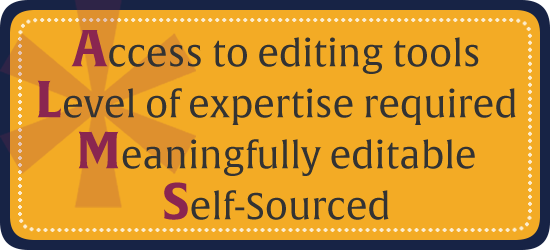
Specifically, the ALMS Framework encourages us to ask questions in four categories:
Access to Editing Tools
- Is the open content published in a format that can only be revised or remixed using tools that are extremely expensive (e.g., 3DS MAX)?
- Is the open content published in an exotic format that can only be revised or remixed using tools that run on an obscure or discontinued platform (e.g., OS/2)?
- Is the open content published in a format that can be revised or remixed using tools that are freely available and run on all major platforms (e.g., OpenOffice)?
Level of Expertise Required
- Is the open content published in a format that requires a significant amount technical expertise to revise or remix (e.g., Blender)?
- Is the open content published in a format that requires a minimum level of technical expertise to revise or remix (e.g., Word)?
Meaningfully Editable
- Is the open content published in a manner that makes its content essentially impossible to revise or remix (e.g., a scanned image of a handwritten document)?
- Is the open content published in a manner making its content easy to revise or remix (e.g., a text file)?
Self-Sourced
- Is the format preferred for consuming the open content the same format preferred for revising or remixing the open content (e.g., HTML)?
- Is the format preferred for consuming the open content different from the format preferred for revising or remixing the open content (e.g. Flash FLA vs SWF)?
Using the ALMS Framework as a guide, open content publishers can make technical choices that enable the greatest number of people possible to engage in the 5R activities. This is an invitation to all OER content publishers (including you!) to be thoughtful in the technical choices they make – whether they are publishing text, images, audio, video, simulations, or other media.
Don’t feel like you need to know the answers to all these questions on your own, however. If you’re a faculty member building new open content, those in supporting roles on your campus will help you get to the point of technical openness as well as licensed openness. Seek their guidance and support as you build.
More to Explore
Determining Technical Openness
This chapter from the University of Hawaii’s OER handbook explores the ALMS Framework and provides key takeaways under each category.
The Four R’s of Openness and ALMS Analysis: Frameworks for Open Educational Resources
This article discusses four separate aspects of reuse and demonstrates how these aspects describe different levels of openness.
Adapted from "Considering Technologies" by Laura Murray and Phylise Banner on behalf of SUNY OER Services
Integrating OER: Selecting a Delivery Platform
Selecting a Delivery Platform

You’ve done the work of finding OER and mapping it to your learning objectives. Now comes the technical challenge of identifying the optimal platform for editing the OER and the best method for integrating it.
An easy way to think about this choice is answering these two questions:
- How do I want my students to access course learning materials?
- How comfortable am I in learning some new technology tools?
Remember, OER gives you the ability to choose any number of ways for students to access OER. Regardless of the modality in which you are teaching, all of these options are available with OER.
Depending on the choice you make, here are some recommendations for each access method:
The Open Web
Open courses can also be offered on the open web outside of a learning management system (LMS). This might look like an interactive syllabus with one or more links to course content each week. It could also consist of a website built specifically for a class. Considerations for this approach are:
- Managing the confidentiality of assessments and grades via available tools and apps
- Ensuring that the licensing of your materials is truly open (Creative Commons, Public Domain, etc)
- Offering the full course to those who wish to adopt it
Tools recommended for customizing and integrating OER using the Open Web:
Pressbooks
If your goal is for the broadest options for editing, sharing, and integrating your open content, Pressbooks is the optimal platform. It is an open source application, allows multiple editors on a single “book,” and can be integrated into any learning management system that supports the Learning Tools Integration (LTI) protocol.
Wiki
Most wiki platforms are free, easily accessible, and usable for both the instructor and learners. They present no barriers of use to collaborative open pedagogy assessments and assignments. Possible wiki options Wikidot and Pbworks.
The drawback of using a wiki to create and customize your open course or content is that these platforms cannot be seamlessly integrated into a learning management system, or easily exported and shared. Note that some LMS do have wiki tools built in.
Word-processing, Spreadsheets, Presentations, and Paper
Open textbooks are created in Microsoft Word every day. Open content can be authored and customized in any application you desire. For the purposes of customizing, integrating, sharing, engaging, you can make any platform work if you have technical savvy and/or support.
Google Drive programs (Docs, Sheets, Slides) are popular tools because of the ease of collaborative editing and printing options they permit.
Pressbooks is the most commonly used OER creation, customization, and integration platform because it was designed for that purpose. Similar platforms are available from ISKME (OER Commons); Intellus Learning; and PanOpen. So if Pressbooks is not available to you, one of these other options may be.
Content Management/Learning Management Systems
Content Management Systems (CMS)
Content management systems are used to store and display content on a website. You can share information in almost any digital format using a CMS. A significant difference between a CMS and an LMS (learning management system) in that a CMS does not offer the tools for creating, managing, and grading assessments and assignments. However, CMSs are frequently used as open course platforms. The drawbacks of using a CMS for open course/content creation and customization is that integration into an LMS may be limited, or not available at all. Content may not be able to be readily exported and shared.
Learning Management Systems (LMS)
A Learning Management System, or LMS, is available to you and your students through your campus instructional technology. Popular learning management systems are Canvas, Blackboard and Moodle, but there are several others as well. Within the LMS, instructors may encounter OER resources that are integrated for convenient adoption into their courses. The LMS administrator and/or instructional technologist configures these options.
These resources may include catalogs of open courses shared by fellow faculty, courses available from OER vendors, links to openly licensed learning modules and resources, and/or connections to search OER repositories.
OER can also be adopted from outside the LMS from a variety of sources. Methods for integrating external OER include importing full course packages and customizing them within the LMS, copying and pasting content, linking to content on the open web, and/or integrating content via Learning Tools Integration (LTI) protocol. To learn more about LTI, visit the Basic Overview of how LTI Works from IMS Global.
Adapted from "Selecting a Delivery Platform" by Laura Murray and Phylise Banner on behalf of SUNY OER Services
Integrating OER: Developing Best Practices
Developing Best Practices

When remixing OER, the goal is to work within the framework of the 5Rs (retain, reuse, revise, remix, redistribute) as much as possible.
That means identifying features of your original sources you’d like to remix, as well as making conscious choices during the process of your remixing.
RETAIN: Make, own, and archive your OER content
Retention is not offered by all customization platforms where you make OER, but it is possible. For example making, owning, and archiving can be supported by Lumen Learning, the OER Commons (ISKME), Rebus, and other service organizations that use the Pressbooks, or a similar, platform.
REUSE: Use OER content that exists without changing it
When reusing OER you still have to consider how you will retain it for yourself and redistribute it to others and select your platform with those considerations.
REVISE: Adapt, adjust and modify existing OER content
You may need the expertise of others to convert the OER you are using into a format that can be modified. When selecting your editing platform, keep in mind that you want to retain and may want to redistribute your customized version as well!
REMIX: Combine original or revised content to make something new
Combining content can be a technical challenge. Platforms such as Pressbooks offer robust support for combining content, then sharing it as a coherent whole in wide choice of export formats.
REDISTRIBUTE: Share your OER with others
There are 2 aspects to sharing: 1) placing your OER in an accessible location such as an OER repository, and 2) making it available in a variety of editable formats.
Keep these 10 best practice tips in mind as you customize and integrate OER into your teaching, learning, research, and practice:
- Before you jump into revising and remix your OER, plan out all the learning environments in which you will be using it: LMS, face to face, blended, open web, etc.
- Identify the formats you will need: print, e-book, LMS modules, web pages, lab manuals, etc.
- Consider the merits of LTI remote integration – especially if you are using the same content across a variety of learning environments.
- Ask Questions! Your instructional technology support system, instructional designers and technologists, OER vendors and services, experienced colleagues, communities of practice — all can all offer insights into best practices for your discipline and/or OER needs.
- Identify the technology tools you think support your needs and goals and try them out with a cohort that you engage in helping you evaluate their efficacy in meeting learning outcomes as well as activities.
- Make customization and integration an iterative process and don’t lock into one platform or distribution method. Stay open and flexible to developing OER and learning environment technologies.
- Leverage the collaborative technological aspects of customization and integration to promote a shift to open pedagogy.
- Keep “Redistribute” in mind as your OER course matures and consider the viability of sharing your work on a wider and wider scale.
- Keep students and colleagues engaged in customizing your content to keep it fresh and reap the benefits of peer-review and collaboration creativity.
- Don’t get stuck on keeping anything “stable” because the technology supporting OER is changing rapidly.
The common theme for remixing is “usability.” Different tools have different advantages and disadvantages, but the goal is for you to be able to create the product that serves your needs most efficiently. Sometimes that might mean relying on tools you’re comfortable with and know well; other times it might mean there’s an option for a new tool that can save you a lot of work.
Consulting with others who’ve done OER work, particularly those in your same field of discipline, can be a huge time-saver in the long run.
Adapted from "Developing Best Practices" by Laura Murray and Phylise Banner on behalf of SUNY OER Services
Week 3 Check Your Understanding Activity 2
Week 3 Assignment: Create A Resource
Create a worksheet that would help other faculty, instructional designers, and librarians to explore, evaluate, and customize OER.
Your worksheet should provide areas for others to provide reflective narratives on the OER customization process.
Be sure that your worksheet addresses the following questions:
- What OER exist within your specific discipline?
- Where are you seeing gaps? What is missing?
- What is your plan to address what is missing?
- Does content needs to be customized, or created from scratch?
- Who will you need to work with?
- What will you need to have in place in order to customize and integrate OER into your teaching, learning, and research?
You can create a worksheet in document or spreadsheet format, using Google or Word tools, or any other application of your choice.
We encourage you to add a Creative Commons license to your work.
Remember, you can always search for an OER customization/integration worksheet and customize it for this project, I have also included a few examples below.
Please upload your work to this assignment's Discussion Board (Hit Reply, Attach File will be in the lower left-hand corner) or email your template to cetl@mhu.edu.
Week 3 Share Your Thoughts
Visit the Week 3 Share Your Thoughts Discussion Board Post and share your thoughts regarding at least one of the following ideas building on information you learned in this module: We encourage you to read and respond to your peers as we gain a tremendous about of knowledge from each other.
- What you have learned in this course
- Examples of how faculty are using OER
- OER that you find useful
- Your thoughts on open pedagogy
