Welcome to Identifying, Finding, and Adopting OER
With OER, you have the freedom to move beyond the confines of a single textbook that may not match your exact needs. With that freedom comes a sense of liberty, and maybe a little trepidation.
How do you find these texts? How do you know if they can be considered OER? Can you use more than one textbook, or even parts of many? How will you pull all of this together? Where will you turn for help along the way?
Upon successful completion of this course, you will be able to:
- Define and describe the characteristics of OER
- Articulate the difference between free-to-access, public domain, and open licensing
- Recognize and distinguish between different types and formats of OER
- Access and use OER search utilities and services
- Locate OER related to specific subjects or disciplines
- Evaluate the source and quality of OER
- Select OER for course adoption
Welcome Video
Identifying, Finding, and Adopting OER
Welcome to Identifying, Finding, and Adopting OER
With OER, you have the freedom to move beyond the confines of a single textbook that may not match your exact needs. With that freedom comes a sense of liberty, and maybe a little trepidation.
How do you find these texts? How do you know if they can be considered OER? Can you use more than one textbook, or even parts of many? How will you pull all of this together? Where will you turn for help along the way?
Upon successful completion of this course, you will be able to:
- Define and describe the characteristics of OER
- Articulate the difference between free-to-access, public domain, and open licensing
- Recognize and distinguish between different types and formats of OER
- Access and use OER search utilities and services
- Locate OER related to specific subjects or disciplines
- Evaluate the source and quality of OER
- Select OER for course adoption
Indentifying OER
Identifying OER
As you continue your journey on the path to OER greatness, an understanding of what OER are (and are not) is imperative. Remember, according to SUNY OER Services, “Open Educational Resources are teaching, learning, and research resources that reside in the public domain or have been released under an intellectual property license that permits repurposing by others.”
OER are “open and free” for the public to use. Seems simple enough, right?
Well, there can be a lot of confusion between “free” to you and the student, and “open,” meaning that copyright restrictions are not “all rights reserved”; instead, the author is granting a less limiting copyright license. Just because something is free, does NOT automatically mean that it’s open.
The license most often associated with OER is the Creative Commons license. It is this less restrictive licensing that copyright holders use to allow access to, and even altering of, their original work. Going back to the 5Rs of OER, we know that Creative Commons licensing enables us to retain, reuse, revise, remix, and redistribute content.
Watch this video for a review of Creative Commons licensing and an introduction to copyright:
All Rights Reserved
To better understand why Creative Commons licensing is so integral to the OER movement, let’s do a quick review of copyright law in the United States.
When you put an idea in a tangible form (written text, art work, music, video, etc.) you automatically are the sole owner of that content. You hold the copyright. It is guaranteed to you through Article 1, section 8, clause 8 of the United States Constitution. It is no longer necessary to even put the copyright symbol on the object. As long as it is your original idea and is documented somehow, you own it.
Often, you see the wording “all rights reserved” next to the copyright symbol. This phrasing means that the original author is the only one who can use the material, make copies of it, gain profit from it, and most importantly for this conversation, distribute and/or make changes to the content. People may not use this material without permission of the author. So one thing you can do to verify whether a work is open is to look for the copyright symbol or the “all rights reserved” notice. Sounds simple enough when you read it, but online, it can get confusing.
If an article is free on the internet, can you use it? Well, it depends. Free to use, is not the same as copyright free. Remember, a creator doesn’t have to put a copyright symbol on their work for it to be copyrighted.
Fair Use
Fair use is an exception that exists within U.S. Copyright law. It is this exception that allows teachers, for example, to use copyrighted materials in the classroom for certain situations (note that this is only for those within a not-for-profit academy).
According to Stanford University Libraries, fair use within the educational context is defined as follows:
“… copyrighted materials can be used without permission in certain educational circumstances under copyright law or as a fair use. ‘Fair use’ is the right to use portions of copyrighted materials without permission for purposes of education, commentary, or parody.”
Fair use does not mean that you can photocopy an entire book, or website in the name of “educational use.” You also can not use the same material over and over again in a course. Generally, if your use of this copyrighted material infringes on the author’s copyright, you have violated fair use.
It is often tricky to identify fair use, but there are several fair use checklists available that help determine if you are following the guidelines.
- The Stanford University Libraries provide an excellent overview of fair use, with examples and considerations: Measuring Fair Use: The Four Factors.
- Another fair use checklist from Columbia University: Fair Use Checklist
In short, fair use allows you to use copyrighted materials with very limited use. Most important for this discussion is that fair use does not allow you to distribute or alter the content except under the guidelines offered in the links above. In the brick and mortar days, this meant that a chapter of a book could be put on reserve in the library and/or a class set of a reading could be distributed, for example. Online, things get a little more complex.
When building the content of an online course within a Learning Management System (LMS) such as Blackboard or Moodle, faculty need to be equally as vigilant with materials. Using images and YouTube videos, also fall under Fair Use guidelines (if they have a copyright license).
Here are some things you should avoid:
- Using the same copyrighted images, semester after semester, in your PowerPoint slides.
- Copying entire books or series of chapters and distributing them to your students (or uploading them to an LMS). Note that password protection within the LMS does not serve as an exception.
Additionally, if there is an article that you wish your students read for an assignment, libraries will ask you to link to the article as opposed to putting the PDF into the course, as libraries pay to link to content and not embed the content. Similarly, you should always link out to copyrighted website content instead of copying the content directly into your course. Work with your reference librarians to identify the best links to provide to your students, when possible.
There are exceptions to U.S. Copyright Law for instructors. The American Library Association has a tool that helps instructors evaluate their use of copyrighted material for instructional use: Exceptions for Instructors eTool.
Learn from this fun and informative overview of U.S. copyright law and its impact on colleges and universities:
https://www.youtube.com/watch?v=2UWaQK5Wbvs&feature=player_embedded
Note that we are sharing a link to this video instead of embedding it in the course, due to the copyright information associated with this learning asset.
There are a lot of restrictions for copyright protection, and it gets difficult to navigate. Recent history shows us that there are many legal battles over fair use, so learning what you can (and can’t) do is important.
Many of us just want to offer no-cost options to our students. So what are we to do?
Open Licensing
An answer to the restrictions we encounter with “all rights reserved” material and navigating fair use is open licensing. As stated earlier, is central to why and how OERs are able to exist.
Open licensing is a legal way for a creator to loosen up the copyright restriction of “all rights reserved.” With the ease of putting content on the internet, more and more individuals publish their own work. Given what we’ve learned about copyright, putting something on the web makes it tangible, and therefore by default, makes is copyrighted and “all rights reserved.” However, by applying Creative Commons licenses, copyright holders can modify their default “ALL rights reserved,” into SOME rights reserved, thereby making it easier for other people to share and build upon their content.
Creative Commons (CC) is a non-profit global organization that began in 2002, answering the call for less restrictive copyright licenses that allow for more collaboration and creativity on a work, without waiting decades for it to enter the public domain. The CC organization offers legal tools that help you place the appropriate Creative Commons license on your work.
Creative Commons licensing is the most commonly used way for creators to modify their copyright. With Creative Commons licensing, OER carry the permissions for users to freely download, edit, and share the content to better serve all students.
The licenses are free, and their easy-to-understand language and symbols help creators navigate through the process of selecting how they want their work to be used by others. It is important to understand that a CC license is not in violation of copyright and does not replace or mean you are giving up copyright; in fact, CC licensing cannot exist without copyright law. Remember, it is taking an “all rights reserved” and making it “some rights reserved.”
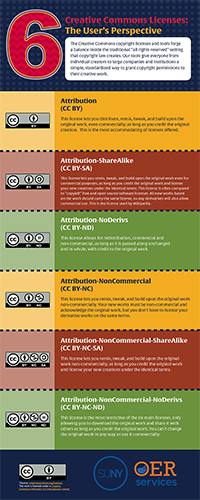
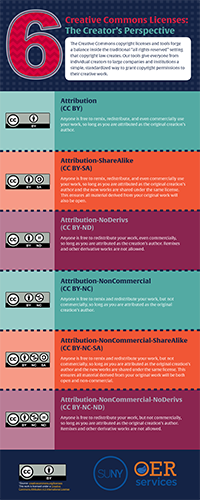
Explore the Creative Commons infographics shared below to review each of the licenses from the users and creators perspectives. Click on the image to download a PDF version of the infographic.
Another graphical representation from Creative Commons Poland breaks down the various references used in Creative Commons licenses.
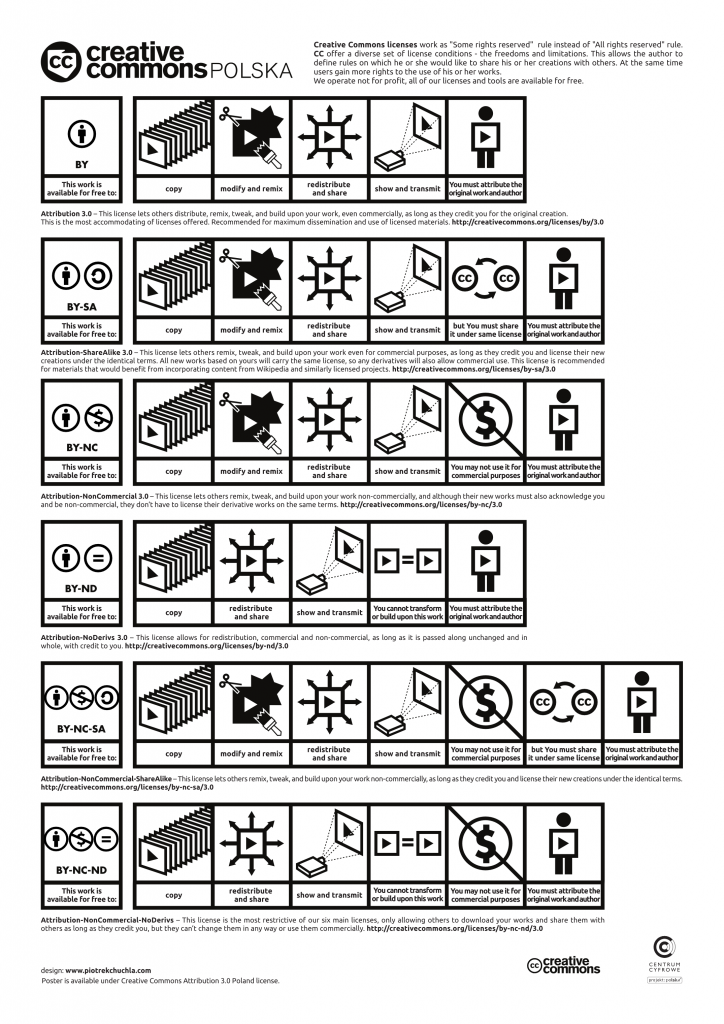
You can visit the Creative Commons Polska site to download a PDF version of the poster.
Remember, Creative Commons is not synonymous with OER. Rather, most Creative Commons licenses facilitate the creation and propagation of OER.
Recognizing an OER
Now that we know what Creative Commons is, how it relates to OER, and can define the various license types, let’s explore how to recognize OER.
To start, look for a Creative Commons license. If a learning asset is OER, it most likely has a Creative Commons license applied to it. Places where you will typically find Creative Commons attribution statements to identify an item as openly licensed:
- In the sidebar or footer of a webpage
- Alternatively, look for “terms of use” or a “licensing” page on the website
- On the inside front cover of a publication (online or print)
- On the back page of a publication (online or print)
Remember, the key distinguishing characteristic of OER is its intellectual property license and the freedoms the license grants to others to share and adapt it. If a lesson plan or activity is not clearly tagged or marked as being in the public domain or having an open license, it is not OER. It’s that simple.
About This Content
The above, adapted by Kevin Mulhall (Mars Hill University) and Dr. Chris Cain (Mars Hills University), is adapted from "Identifying, Finding, and Adopting OER" by Kerrie Wilkes and Phylise Banner on behalf of SUNY OER Services. The original work is licensed under a Creative Commons Attribution 4.0 International License. The adapted version by Kevin Mulhall and Dr. Chris Cain is also licensed under a Creative Commons Attribution 4.0 International License.
Check Your Understanding Week 3 Activity 1
Public Domain
That a work is publicly accessible (i.e.,"free on the internet") does not mean that the work is in the public domain.
Simply stated, public domain works are works that are copyright free. No one owns the copyright.
There are two types of specific works that fall under this category. The first are works that never had copyright to begin with such as all items created by the U.S. federal government. The second group refers to those works whose copyright has run out.
The law acknowledges that while copyright is important to the original creator, knowledge is built upon and should not be restricted forever. Generally speaking, items that have a U.S. copyright date before 1930 are no longer supported by the “all rights reserved” elements of copyright law. Generally speaking, copyright is extended to 70 years from the death of the author, so recent works will not be in the public domain for many years. There are, of course, some exceptions to the rules.
Watch this fascinating video about Public Domain works from Jennifer Jenkins, Duke University School of Law.
If you want more information about such exceptions, a great resource is found at the Cornell University Library Copyright Information Center (https://copyright.cornell.edu/publicdomain)
Adapted from SUNY OER Services "Exploring Other Open Licenses."
Reviewing Types of OER
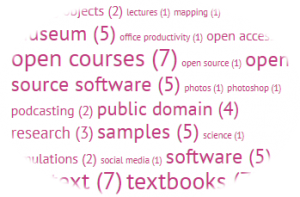
Types of OER include full courses, course materials, modules, learning objects, open textbooks, openly licensed (often streamed) videos, tests, interactive multimedia elements, software, and other tools, materials, or techniques used to support teaching and learning. Any content that is available to use for teaching and learning, that has an open license, can be considered OER.
OER may be static resources, or even dynamic resources that adapt in real time while content contributors interact with and updating them. OER can even be an entire module, course, or textbook made up of a combination of other OER resources.
We will explore some OER repositories and do searches in OER Repositories/Portals.
OpenCourseWare
OpenCourseWare are course lessons created at universities and published under an open license. The OpenCourseWare movement started in 1999 when the University of Tübingen in Germany published videos of lectures online for its timms initiative (Tübinger Internet Multimedia Server). The OCW movement took off in the United States with the launch of MIT OpenCourseWare at the Massachusetts Institute of Technology (MIT) in October, 2002.
EXPLORE MORE ABOUT MIT OPENCOURSEWARE
The movement was soon reinforced by the launch of similar projects at Yale University, the University of Michigan, and the University of California Berkeley. MIT’s reasoning behind OpenCourseWare was to “enhance human learning worldwide by the availability of a web of knowledge.”
Open Textbooks

Photo by Sharon McCutcheon on Unsplash
Open textbooks refer to textbooks licensed under an open copyright license, and made available online to be freely used by students, teachers and members of the public. Many open textbooks are distributed in either print, e-book, or audio formats that may be downloaded or purchased at little or no cost. Open textbooks either reside in the public domain or are released under an open license that grants usage rights to the public so long as the author is attributed.
Part of the broader open educational resources movement, open textbooks increasingly are seen as a solution to challenges with traditionally published textbooks, such as access and affordability concerns. Open textbooks were identified in the New Media Consortium’s 2010 Horizon Report as a component of the rapidly progressing adoption of open content in higher education.
Many of these OER textbooks provide test banks (and power points, and other supplementals that you may be used to getting from a publisher). Nicole Finkbeiner of OpenStax explains how these are kept secure:
“In terms of ‘protected’ resources such as test banks, you have to find a way for students to not be able to access these. And, you don’t want to openly license these because then you have no way to combat them being published. At Rice University’s OpenStax College, our website is set up so faculty have to first register for an account and then request faculty access prior to being able to download them. We check every single account to ensure the right official email is used, they are in fact teaching a course where they would need the resources, etc. Sometimes we even call the department chair directly to make sure we should be providing access.”
It’s true that adopting open resources in place of a traditionally published textbook involves a change in how you think about your course textbook. Are you still working with a static publication with no room for content updates?
With OER you don’t need to wait for the publisher to come out with a new edition in order to correct a mistake or update old information. Depending on the OER license, you may have the right to update any OER yourself or notify the author that something needs to be updated or adapted. Or you may find that other members of the community have already completed an update, and shared their adapted version for you to draw from, as well.
Adapted from SUNY OER Services "Reviewing Types of OER"
Developing a Search Strategy
You can find OER by using the search engines you already use, or by searching or browsing any of the OER repositories listed below. Note that as you explore these options, you need to come up with a search strategy that will work best for you. If you have ever searched for anything online, you know that how you formulate your question, or put in keywords, will reflect in your search results.
Before you even begin searching, take note of the options that you may have while looking for OER.
Search by course name:
Yes, there are full OER textbooks, and even full courses! You may have a specific course, like Calculus II, that you’d like to use OER with, or even use all OER course materials for.
Search by discipline:
Are you looking for science resources? English? History? Many of the OER Repositories enable you to begin narrowing your search at the discipline level – even before you enter any specific keywords.
Search by education level:
Are you looking for materials geared for undergraduates? Graduate students? Faculty? Instructional designers? Knowing who your audience is in advance will help you to filter out search results.
Search with learning objectives in mind:
Many of us strive to find course materials that are in alignment with institutional, course, and/or modular objectives. Refer to your course (and/or program) learning objectives before you begin searching, so that you can focus your search on learning content that will help your students meet those objectives.
Search by asset type:
Are you looking for a full course? A textbook? A few exercises or problem sets to engage your students? A video or two for students to base discussion around? You can begin your search without knowing exactly what type of asset you are looking for, but once you get the initial search results, you will want to start narrowing things down. Again, go back to those learning objectives and consider how you want your students to meet those objectives – and what they will need to do just that!
Search by license type:
Are you going to use the OER you find as is, or are you looking for something that you can build upon? Make sure you have a clear understanding of Creative Commons and other open licenses before you start searching, so you know what options are open to you regarding editing and publishing the content you find.
Search by keyword:
This is last on the list for a reason. You may be used to typing in keywords to search for any and everything on the web, and your results may be stellar. That is because most web content is carefully tagged with keywords to ensure that content is findable.
Adapted from SUNY OER Services "Developing a Search Strategy."
Using Search Tools
There are a plethora of OER search utilities out there – from search engines to discipline specific OER repositories. There are search tools that will help you find images, and search tools that will help you find full courses. Here we explore some of those tools, and provide resources for you to explore more on your own.
Google Advanced Search
A Google search alone can direct you to OER resources, but the Advanced Search feature in Google lets you search by ‘usage rights’ for content published to the Internet under an open license. The Advanced Search dialogue can be found under the Settings function or can be directly accessed at http://www.google.com/advanced_search.
Watch this two-minute video from Utah State University to see how it's done:
Adapted from SUNY OER Services "Developing a Search Strategy."
OER Repositories
These repositories and finding aids link to every kind of OER from single items to entire courses and websites. Therefore, it can be challenging to find exactly what you want. The trick is to understand the limiting tools for each site and to search with the ideas in mind that were presented in the "Developing a Search Strategy" page. For a more detailed list of OER and OAR (Open and Affordable Resources), go to the "Additional Resources" tab on the left-hand site navigation.

Maintained by the California State University System, this collection has over 100,000 OER of all types including open textbooks, videos, assignments, quizzes, and full online courses. Merlot's search interface also aggregates resources from other OER repositories and the general web. The content is contributed and used by an international education community. Merlot also has its own content builder.

"Openly Available Sources Integrated Search (OASIS) is a search tool that aims to make the discovery of open content easier. OASIS currently searches open content from 114 different sources and contains 440,452 records."

Large repository of OER. Users can also create a "hub," that "bring(s) groups of educators together to create, organize, and share OER collections that meet their common goals." OERCommons also has its own content authoring tool.
OER Textbooks
If you know you are looking for an OER textbook, it is best to start your search with one of the following repositories which are textbook-only repositories.

An NCLive OER Commons Hub. Textbooks for 30 of the most frequently-taught courses across North Carolina’s 2 and 4-year colleges and universities.

About 70 titles. All textbooks undergo a rigorous peer review process and meet standard scope and sequence requirements, making them seamlessly adaptable into existing courses.

About 1000 OER original (non-derivative) textbooks. All texts are required to be in use at multiple higher education institutions.

A searchable repository of OER focused on the humanities
Keeping Tack & Getting Help
Keeping Track While You Search
What happens when you find an OER that you want to use? We need to find a way to keep track of what we’re finding, right?
If you have a bookmarking utility that you like to use, you can bookmark the URLs for the OER that you find and are considering for use. Or, you can keep track via spreadsheet of what you find, and how you might use it.
Here is an OER Resource Search Result template that you can use to keep track of OER that you find, and to indicate which learning objectives the OER content is in alignment with.
Some OER repositories have their own tools for organizing and bookmarking materials. Usually this requires creating an account. MERLOT and OER Commons, for example allow you to create folders and collections of OER resources.
Asking for Help
You may have trouble finding OER that perfectly fit your needs. When you are in the midst of searching, keep in mind that most OER can used in whole or in part and/or modified and customized to fit your specific needs – except those OER that are licensed under ND (no derivatives).
Remember that you can always reach out to the librarians at your institution's library and/or your Teaching & Learning Center for help. They can help you find OER, and in many instances help you integrate content seamlessly into your course(s).
Adapted from SUNY OER Services "Developing a Search Strategy."
Evaluating OER
Finding OER is the easy part. Determining if the OER will work in your course takes some careful consideration. Lucky for us, there are some fantastic OER evaluation tools that can make this step much easier — from advanced rubrics that are tied to state standards, to simple checklists.
This video provides a short tour about evaluation indicators in MERLOT:
You know your course and teaching approach best. It will be of great benefit for you to find a rubric or checklist that you like, and adapt it to suit your needs. Most of the evaluation tools we share here are openly licensed, so you can do just that.
Consider the following when evaluating OER:
Comprehensiveness. The material covers all areas and ideas of the subject appropriately and provides an effective index or navigation guide.
Accuracy. Content is accurate, error-free and unbiased.
Relevance/Longevity. Content is up-to-date, but not in a way that will quickly make the learning asset obsolete within a short period of time. Any text is written and/or arranged in such a way that necessary updates will be relatively easy and straightforward to implement.
Clarity. Content is written in a clear manner, and adequate context is provided for any jargon/technical terminology used.
Consistency. Content internally consistent in terms of terminology and framework.
Modularity. The content is easily and readily divisible into smaller reading sections that can be assigned at different points within the course (i.e., enormous blocks of text without subheadings should be avoided). The content can easily be reorganized and realigned with various subunits of a course without presenting much disruption to the reader.
Organization/Structure/Flow. The topics are presented in a logical, clear fashion.
Interface. The content is free of significant interface issues, including navigation problems, distortion of visuals, and any other display features that may distract or confuse the reader.
Grammatical Errors. The materials contain no grammatical errors.
Cultural Relevance. The materials are not culturally insensitive or offensive in any way. They should make use of examples that are inclusive of a variety of races, ethnicities, and backgrounds.
OER Evaluation Rubrics and Tools
Note that some of the evaluation tools shared here are meant for full OER courses, not individual course materials.
Achieve Rubrics
These series of eight rubrics were designed to hep states, districts, teachers, and other users determine the degree of alignment of Open Educational Resources (OER) to college- and career-ready standards and to determine other aspects of quality of OER.
OER Assessment Rubric
This rubric is developed by Sarah Morehouse with help from Mark McBride, Kathleen Stone, and Beth Burns is licensed under a Creative Commons Attribution 3.0 Unported License.
[Summarized] Rubrics for Evaluating Open Education Resources Objects
This 2-page rubric is a synthesis version of the eight (8) separate rubrics for the evaluation of OERs created by ACHIEVE.org. It is meant as a ready reference for quick evaluation of an OER. (Credit: Created and shared by Rodney Birch of George Fox University.)
OER Evaluation Criteria
From Affordable Learning Georgia a six component checklist for evaluating OER.
Adapted from SUNY OER Services "Evaluating OER."
Keeping Accessibility In Mind
Open access implies access for all. If learning materials are not accessible for each and every student, do they fulfill the purpose of OER?
Accessibility means that all students can learn from print and digital content, participate in all learning activities, and interact without hindrances. If you find OER that you are interested in using in your course(s), we encourage you to take the time to check for accessibility.
BC Campus Open Education has created an in-depth guide and toolkit to help you assess the accessibility of OER. Although the Toolkit was designed to guide OER creators to create open and accessible textbooks, you can use the guide to learn more about OER accessibility, and to evaluate the OER you are considering adopting for your course(s). There is also a handy checklist at the end of the Toolkit for you to use (and remix!) for your own purposes.
OER Bootcamp 3-4: OERs and Accessibility
Review this 11 minute video on how accessibility for disabled users applies to OER:
Vetting OER for Cultural Relevance, Accessibility and Licensing
For more modeling of accessibility in OER across the United States, view below. This recording from a 1 hour webinar hosted by members of the Open Education Consortium highlights best practices and rubrics developed to ensure that OER content meets instructional material standards, accessibility guidelines, and open licensing policies.
More on Accessibility
W3C Accessibility Standards
This site, from the World Wide Web Consortium (W3C), shares the formal standards for designing and developing accessible web content. The initiatives behind this site aim to provide access for all, including those with disabilities.
WebAim: WAVE Web Accessibility Evaluation Tool
The WebAim site has extensive resources on screen readability and accessibility. This specific page enables you to enter a URL to check on the accessibility of a web-based resource.
Adapted from SUNY OER Services "Keeping Accessibility In Mind."
Supporting OER Adoption
Supporting OER Adoption
As you have learned more about OER, you may have realized that you’re already using OER in your work. It could be a video that you have been using in your classroom for years, or a government document that you have assigned as part of a learning activity.
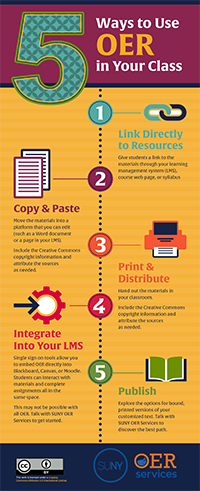
Take a few minutes to explore the 5 Ways to Use OER in Your Class infographic.

Download the 5 Ways to Use OER Infographic
After you have found OER relevant to your course objectives and student learning outcomes, there are a few considerations for ensuring successful adoption of the open materials into your teaching practice.
The evaluation and integration of the material into the course content is most likely your responsibility, but in the process of adoption, you may interact with other faculty, librarians, instructional designers, and campus administrators – all of whom can support your OER adoption.
Attributing a Creative Commons Licensed OER
We have learned that Creative Commons licenses require that the user of a creative work attribute the creator or copyright holder. If you plan to adopt Creative Commons licensed materials then you must include all required attributions, including as much of the following information as possible:
Title and Source. What is the name of the material? Please provide the title of the work you are adopting. Be sure to hyperlink the title to the original sources. If a hyperlink is not available, describe where you got the work.
Author. Who owns the material? Please name the author or authors of the material in question. Sometimes, the licensor may want you to give credit to some other entity, like a company or pseudonym. In those cases, please just do what they request. Also, if the author has a webpage, please link to the author’s page.
License. How can I use it? Please provide the exact name of the Creative Commons license under which the work was released, and hyperlink the license name to the license deed page. You can use the acronyms instead of the full name of the license.
Fortunately, there are tools that can help you build the attribution text so you can simply copy and paste the text from the tool into your materials.
The Open Attribution Builder
The Open Attribution Builder is a web tool to assist users of CC material to properly attribute. It allows you to enter the Title, URL for work, Author and website, Organization, and CC license type and will provide attribution information which can be copied and pasted into your own work containing the CC material. Here is an example of using the tool to provide its own attribution.
“Open Attribution Builder” by Open Washington, is licensed under CC BY 4.0
For text resources (e.g. books, worksheets, PowerPoint slides, etc), include the attribution details where it naturally makes sense, such as immediately preceding or following the work, or as the footer along the bottom of the page on which the Creative Commons work appears. For videos, include the attribution information near the work as it appears on screen during the video. For sound recordings (e.g. podcasts), mention the name of the artist during the recording (like a radio announcement) and provide full attribution details in text near the podcast where it is being stored (eg. blog, school intranet, learning management system, etc).
Getting Curricular Approval (if Needed)
When you adopt OER, consider whether you need to get approval from others at your college for instructional material choices such as the division or department chair, curriculum committee, articulation officer, disability services office, etc. Any institutional policies that are specific to your campus or department regarding course materials should be considered well in advance so you can make a smooth transition to OER.
Delivering OER to Your Students

Photo by Ryan Jacobson on Unsplash
There may be several stakeholders on campus involved in delivering instructional materials to students, including the bookstore, library, IT help desk, and academic support services. It is important to engage these stakeholders in your move to OER as they can all assist in the smooth delivery of open materials to students.
The simplest and most economical method of delivering OER to students is to embed it into your institution's LMS (Blackboard, CANVAS, Moodle, etc.).
Work with your institution's teaching & learning center to help you implement OER you select into your LMS course.
Additionally, you may provide a link for students to view the OER online or to download it. Most open textbooks are available in a few different downloadable formats, such as PDF, ePub, Mobi, or DAISY formats. Keep in mind that certain formats may be preferable for students with visual impairments.
Downloadable options may also be useful for students without reliable Internet access so they can download the material to their computers or mobile devices for offline access.
Low-cost printing is another option for open textbooks. Some OER textbook providers offer low-cost printing services directly from their websites. Students may also use free printing allowances to print chosen sections of the textbook.
Consider combining as many of these approaches as possible. Students will appreciate all the methods that are possible to access their course materials, and most will make use of multiple methods throughout the semester.
Adapted from SUNY OER Services "Supporting OER Adoption."
Check Your Understanding Week 2 Activity 2
Additional Resources (optional)
Finding OER
Check out this great live spreadsheet of OER repositories and finding aids curated by Alex Sharp, Information and Service Librarian at Tennessee Wesleyan University.
Identifying OER
Creative Commons
The Creative Commons site explains more about OER, and accompanying licenses. Click on the link to Use and Remix to learn more about finding, and adopting OER.
OER Mythbusting
This publication from SPARC (the Scholarly Publishing and Academic Resources Coalition) sheds light on common myths related to OER.
Copyright and Fair Use Permissions Guide For Educators
This guide provides a primer on copyright and use permissions. It is intended to support teachers, librarians, curriculum experts and others in identifying the terms of use for digital resources, so that the resources may be appropriately (and legally) used as part of lessons and instruction.
Copyright and Fair Use
This robust site from Stanford University includes detailed cases as well as examples of fair use and policies. Of note are the copyright charts and tools that can help you evaluate copyright status and promote best practices.
Copyright and Fair Use Animation from Common Sense
This short video provides tips for students (and faculty) on how to recognize and cite copyright works.
Other Open Licensing
GNU Licensing
This site focuses on GNU licensing – which is specific to open software.
Guide to Open Licensing
This guide highlights the definitions of open licenses, along with why and how you can use them. Scroll down for additional resources to other open licensing sites.
Open Licenses
This resource from Project Open Data shares more insight on the range of open licenses, with specific examples of each type.
Accessibility
Accessibility Toolkit
BC Campus Open Education has created an in-depth guide and toolkit to help you assess the accessibility of OER. Although the Toolkit was designed to guide OER creators to create open and accessible textbooks, you can use the guide to learn more about OER accessibility, and to evaluate the OER you are considering adopting for your course(s). There is also a handy checklist at the end of the Toolkit for you to use (and remix!) for your own purposes.
W3C Accessibility Standards
This site, from the World Wide Web Consortium (W3C), shares the formal standards for designing and developing accessible web content. The initiatives behind this site aim to provide access for all, including those with disabilities.
WebAim: WAVE Web Accessibility Evaluation Tool
The WebAim site has extensive resources on screen readability and accessibility. This specific page enables you to enter a URL to check on the accessibility of a web-based resource.
OER Adoption and Delivery
Open Attribution Builder
The Open Attribution Builder is a web tool to assist users of CC material to properly attribute. It allows you to enter the Title, URL for work, Author and website, Organization, and CC license type and will provide attribution information which can be copied and pasted into your own work containing the CC material. Here is an example of using the tool to provide its own attribution.
The OER Adoption Impact Calculator
The OER Adoption Impact Calculator helps you understand many of the potential impacts of adopting OER instead of traditionally copyrighted learning materials. You can adjust the settings to match OER initiatives at your institution, and the impact charts will update in real time as you make those adjustments.
Adapted from SUNY OER Services "Additional Resources."
